Digital AssetAvailable
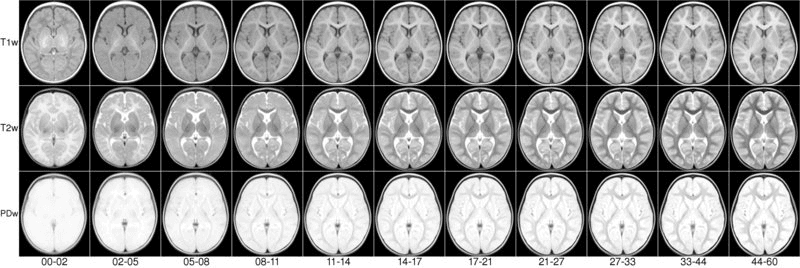
Infant Atlases (0-4.5 years)
Quote on request
Faculty of Medicine and Health Sciences
Biomedical Engineering
McGill University
Listed for reference. Requests for this resource aren't handled here.
We present an unbiased magnetic resonance imaging template brain volume for pediatric data from birth to 4.5y age range. These volumes were created using 317 scans from 108 children enrolled in the NIH-funded MRI study of normal brain development (Almli et al., 2007, Evans and Group 2006).
Viewing
To view the atlases online, click on the appropriate JIV2 link.
Online viewing requires Java browser support. The Java Internet Viewer (JIV2) used here is available for download and personal use under the GNU general public license (GPL).
License
Copyright (C) 1993–2004 Vladimir S. Fonov, Louis Collins, McConnell Brain Imaging Centre, Montreal Neurological Institute, McGill University. Permission to use, copy, modify, and distribute this software and its documentation for any purpose and without fee is hereby granted, provided that the above copyright notice appear in all copies. The authors and McGill University make no representations about the suitability of this software for any purpose. It is provided “as is” without express or implied warranty. The authors are not responsible for any data loss, equipment damage, property loss, or injury to subjects or patients resulting from the use or misuse of this software package.
When viewing, the stereotaxic coordinates (X,Y,Z) are displayed in the first row below the volumes. One can use the left most mouse button to click on any image, and the other cross-sectional images will be updated with the appropriate position. You can also hold the middle/rocker mouse button down while moving up or down, to pan through the image plane. Holding ‘Shift’ with the left or middle button will enable dragging and zooming. When looking at the images, remember that left is left and right is right!

NIST Lab
Faculty of Medicine and Health Sciences
Research lab focused on advancing scientific knowledge and innovation.
LC
Louis Collins
NIST Lab · McGill UniversityDigital AssetAvailable
Infant Atlases (0-4.5 years)
Quote on request
Faculty of Medicine and Health Sciences
Biomedical Engineering
McGill University
Listed for reference. Requests for this resource aren't handled here.
We present an unbiased magnetic resonance imaging template brain volume for pediatric data from birth to 4.5y age range. These volumes were created using 317 scans from 108 children enrolled in the NIH-funded MRI study of normal brain development (Almli et al., 2007, Evans and Group 2006).
Viewing
To view the atlases online, click on the appropriate JIV2 link.
Online viewing requires Java browser support. The Java Internet Viewer (JIV2) used here is available for download and personal use under the GNU general public license (GPL).
License
Copyright (C) 1993–2004 Vladimir S. Fonov, Louis Collins, McConnell Brain Imaging Centre, Montreal Neurological Institute, McGill University. Permission to use, copy, modify, and distribute this software and its documentation for any purpose and without fee is hereby granted, provided that the above copyright notice appear in all copies. The authors and McGill University make no representations about the suitability of this software for any purpose. It is provided “as is” without express or implied warranty. The authors are not responsible for any data loss, equipment damage, property loss, or injury to subjects or patients resulting from the use or misuse of this software package.
When viewing, the stereotaxic coordinates (X,Y,Z) are displayed in the first row below the volumes. One can use the left most mouse button to click on any image, and the other cross-sectional images will be updated with the appropriate position. You can also hold the middle/rocker mouse button down while moving up or down, to pan through the image plane. Holding ‘Shift’ with the left or middle button will enable dragging and zooming. When looking at the images, remember that left is left and right is right!
NIST Lab
Faculty of Medicine and Health Sciences
Research lab focused on advancing scientific knowledge and innovation.
LC
Louis Collins
NIST Lab · McGill UniversityYou might also like
Discover more resources that could support your research